Client Certificates for EPP
Contents
EPP Authentication & Validation
How to upload a Certificate RSP Platform
EPP Authentication & Validation
Nominet has updated the certificate handling process for EPP validation on our RSP platform. This shift aims to address the public certification changes and to increase flexibility for cloud-native environments whilst maintaining robust security. This functionality is for all gTLD, .pn and .gov.uk users and for the future state .UK Registry Standardisation which is currently in a testbed environment, but not the legacy .UK platform. At the point of transition the functionality will merge and be available for .UK in testbed, OT&E and production.
IP Allow-Listing
To better support dynamic infrastructure, we will remove the requirement for IP allow-listing on EPP connections. Authentication will transition to being validated based on the pre-shared certificate presented by the client; username and password.
Certificate Validation Models
We will support any certificates issued by public Certificate Authorities (CAs), private CAs, or self-signed certificates. To authenticate via EPP, registrars must pre-share public certificate elements with Nominet.
How to upload a Certificate RSP Platform
Registrars can upload public certificate directly to their account via our Online Services portal. The functionality is the same for all registries but as .UK is not currently operating on the same platform the route to access the configuration is different for .UK until the point of transition. A full walkthrough of both pages is below:
All registries, except .UK, will see a new menu item in the GTLD Registrar panel called “Manage EPP Certificates”. .UK configuration can be managed from the “Tag Settings” panel.
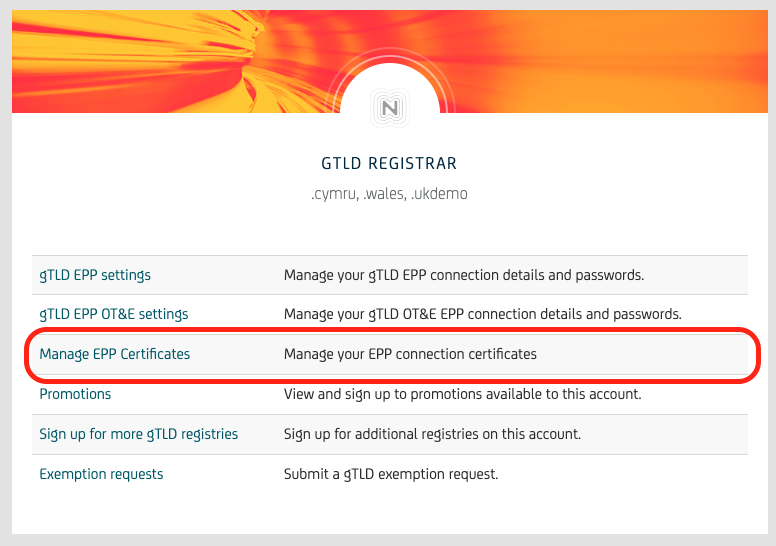
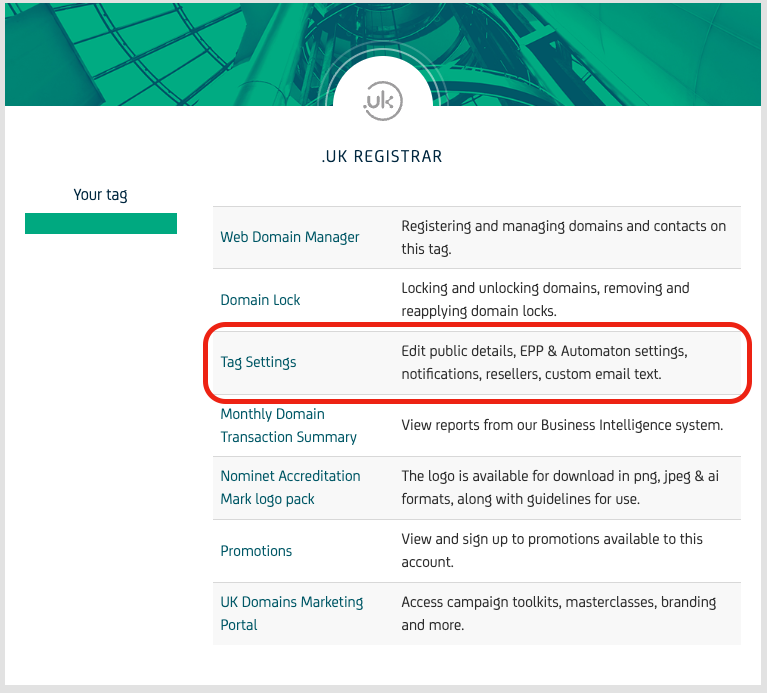
Both of these will navigate you to the Manage EPP Certificates page.
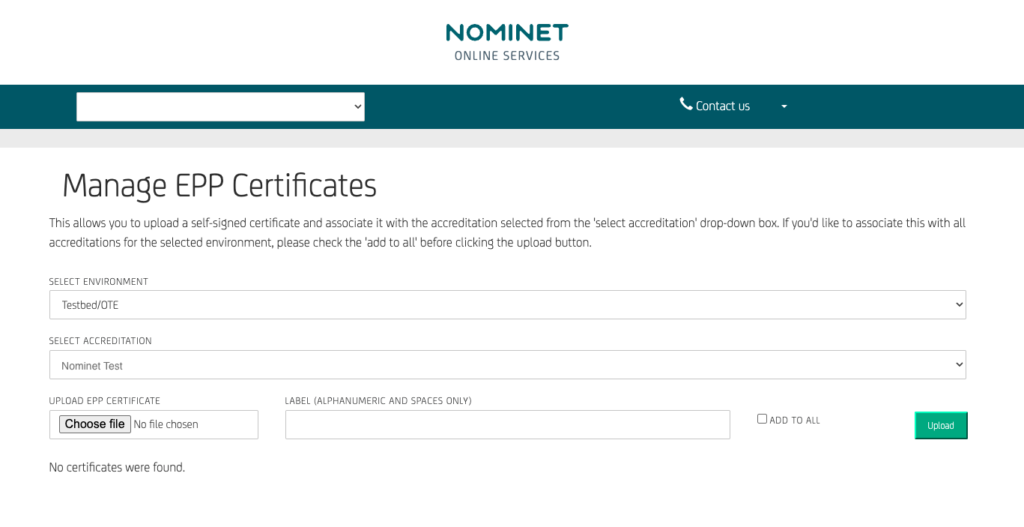
The Manage EPP Certificate page allows you to Select the environment that you would like to upload the certificate (Testbed/OTE or Production), choose an accreditation, and add a label to make it easier for you to manage multiple certificates.To upload the certificate to the selected environment for all accreditations on the account tick the ‘ADD TO ALL’ checkbox, this functionality is explained in the hover-over text. If there is only one accreditation on the account the tick box will not be present.
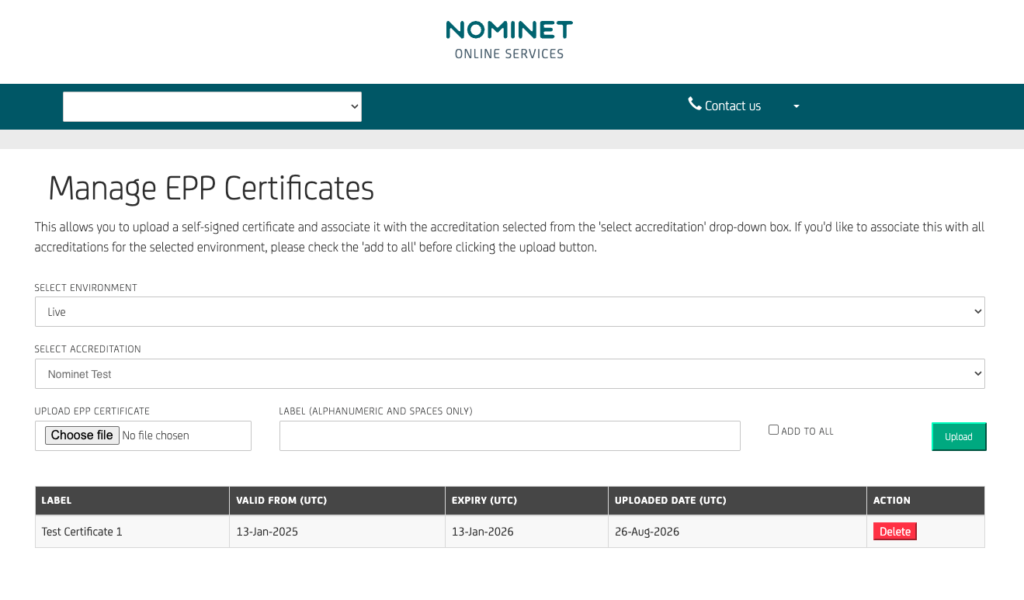
Once the certificate has been uploaded it will show at the bottom of the page. If you navigate to different environments or accreditations the table will show you which certificates you have uploaded for each.
Points of note
- Accreditation Linking: Certificates will be stored against the registrar’s specific accreditation.
- Certificate Rotation: Multiple public certificates can be stored simultaneously to facilitate seamless certificate rolling and transitions.
- Validity Limits: Nominet will enforce that a certificate has a valid from date which is less than one year in the past and is valid for at most one year.
- Cache: Certificate validity for an accreditation will be cached for 1 hour; this means it may take up to one hour for a certificate that has been removed from authorisation to stop working.
- Upload times: OTE/Testbed updates may take up to 30 minutes to be reflected in the environment. Production updates will be immediate.
The release will be backwards compatible for those that have not pre-shared certificates to continue to be limited by IP allow list. On supply of a certificate the IP allow lists will cease to be utilised.
FAQs
How long can my certificate be valid for?
Nominet will enforce certificate validity limits. The certificate must have a valid-from date that is less than one year in the past and must be valid for no more than one year.
What type of certificate can I use?
Nominet supports certificates issued by public Certificate Authorities (CAs), private CAs, and self-signed certificates.
Where do I upload my certificate?
For all registries except .UK, certificates can be managed through the “Manage EPP Certificates” option in the GTLD Registrar panel. For .UK, certificates are managed through the “Tag Settings” panel until .UK transitions to the new platform.
Can I upload certificates for different environments?
Yes. When adding a certificate, you can select the environment it applies to, such as Testbed/OTE or Production.
Can I use the same certificate for multiple accreditations?
Yes. If you want to upload a certificate to all accreditations on your account, select the “ADD TO ALL” option. If your account has only one accreditation, this option will not be displayed.
Can I have more than one certificate?
Yes. Multiple public certificates can be stored simultaneously. This is intended to support certificate rotation and transitions without requiring a single certificate to be replaced immediately.
What happens if I remove a certificate?
Certificate validity for an accreditation is cached for up to one hour. As a result, a certificate that has been removed from authorisation may continue to work for up to one hour.
What happens to my existing EPP connection if I don’t upload a certificate?
The change is backwards compatible. If you have not pre-shared a certificate, your connection will continue to be limited by IP allow-listing. Once you supply a certificate, IP allow-listing will no longer be used.
Will certificate management be automated?
Not currently. Nominet intends to develop an automated approach using TLSA records in DNS and will provide further details at a later date.
Does this change apply to all Nominet registries?
The functionality is intended for all gTLD, .pn and .gov.uk users, as well as the future-state .UK Registry Standardisation environment currently in testbed. It does not apply to the legacy .UK platform until transition on the 9th Feb 2027.
Are we able to switch back to IP based whitelisting if we need to?
Once you switch from IP whitelisting to EPP Cert – IP whitelisting will then become unavailable or not required.
Is it possible to have different configs for OTE vs prod for a TLD (example, OTE uses IPs, Prod uses cert whitelisting)?
In theory, this is possible until the transition is complete and IP whitelisting is removed and EPP cert is the only method. We would suggest not having different configs if you can help it however, as this will help with ensuring your connection methods are the same, leaving less room for issues or error.
| If you have questions about your current setup or potential impact, contact Customer Support. |
Minerva House, Edmund Halley Road, Oxford Science Park, OX4 4DQ, United Kingdom